Import and remove users with the API
Use the Integration APIs to manage Secure Print and Secure Print Direct users in bulk with CSV files: import users, remove users, or remove specific user registrations.
You turn on the Integration APIs, and get the Authorization Key they use, under Account Settings > Settings > Enable Integration APIs. The APIs listed there depend on the features your environment is licensed for, such as Secure Print and Secure Print Direct.
Before you begin
- You know which authentication provider your environment uses. The endpoints and CSV fields are different for Active Directory and for OpenID Connect or Internal authentication.
- You have a CSV file with the fields the API needs. See APIs and CSV fields.
- You can run curl commands.
Import or remove users
Turn on the Integration APIs
Go to Account Settings > Settings and turn on Enable Integration APIs. This creates an Authorization Key. Copy it and store it securely.
Select an API on that page to see how to use it.
Prepare the CSV file
Include the fields the API needs. The ...ColumnName parameters in each command name the column headers in your file. If your headers are different, change the values in the command to match.
Send the request
Copy the command for your API and authentication provider from APIs and CSV fields. Replace <base URL>, <Authorization Key> and <CSV file path>.
The base URL is:
- HP US: https://api.insights.hpondemand.com/ext-import-api
- HP EU: https://api-eu.insights.hpondemand.com/ext-import-api
Note: The commands use curl. Use single quotes on Mac or Linux, and double quotes on Windows.
Check the status of the import
How long an import takes depends on how busy the import service is. When you send the request, the response shows that the file was submitted, gives the import GUID, and shows that the job is pending:

To check progress, copy the importGuid and run:
curl -H 'Authorization: bearer <Authorization Key>' <base URL>/imports/<ImportGuid>/information
Result
The users or registrations in your CSV file are imported or removed. The status command shows when the job is complete.
APIs and CSV fields
User Import API
Imports users in bulk, including their card registrations, so large groups don't have to register one by one.
Active Directory
| CSV field | Parameter (column header in the command) | Required |
|---|---|---|
| Username | UsernameColumnName=Username | Yes |
| Domain | DomainColumnName=Domain | Yes |
| Card ID | CardColumnName=Card | Yes |
| First name | FirstNameColumnName=FirstName | No |
| Last name | LastNameColumnName=LastName | No |
| Data privacy region | DataPrivacyRegionColumnName=DataPrivacyRegion | No |
curl -X POST '<base URL>/active-directory-users/import' -H 'Authorization: bearer <Authorization Key>' -H 'Content-Type: multipart/form-data' -F 'UsernameColumnName=Username' -F 'DomainColumnName=Domain' -F 'CardColumnName=Card' -F 'FirstNameColumnName=FirstName' -F 'LastNameColumnName=LastName' -F 'DataPrivacyRegionColumnName=DataPrivacyRegion' -F 'File=@<CSV file path>;type=application/vnd.ms-excel'
OpenID Connect or Internal authentication
| CSV field | Parameter (column header in the command) | Required |
|---|---|---|
| Email address | EmailColumnName=Email | Yes |
| Card ID | CardColumnName=Card | Yes |
| First name | FirstNameColumnName=FirstName | No |
| Last name | LastNameColumnName=LastName | No |
| User groups | UserGroupsColumnName=UserGroups | No |
| Data privacy region | DataPrivacyRegionColumnName=DataPrivacyRegion | No |
curl -X POST '<base URL>/users/import' -H 'Authorization: bearer <Authorization Key>' -H 'Content-Type: multipart/form-data' -F 'EmailColumnName=Email' -F 'CardColumnName=Card' -F 'FirstNameColumnName=FirstName' -F 'LastNameColumnName=LastName' -F 'UserGroupsColumnName=UserGroups' -F 'DataPrivacyRegionColumnName=DataPrivacyRegion' -F 'File=@<CSV file path>;type=application/vnd.ms-excel'
User Removal API
Deletes users and their associated data, such as cards, PINs and passcodes. Use it to deprovision users who no longer need access.
Active Directory
| CSV field | Parameter (column header in the command) | Required |
|---|---|---|
| Username | UsernameColumnName=Username | Yes |
| Domain | DomainColumnName=Domain | Yes |
curl -X POST '<base URL>/active-directory-users/remove' -H 'Authorization: bearer <Authorization Key>' -H 'Content-Type: multipart/form-data' -F 'UsernameColumnName=Username' -F 'DomainColumnName=Domain' -F 'File=@<CSV file path>;type=application/vnd.ms-excel'
OpenID Connect or Internal authentication
| CSV field | Parameter (column header in the command) | Required |
|---|---|---|
| Email address | EmailColumnName=Email | Yes |
curl -X POST '<base URL>/users/remove' -H 'Authorization: bearer <Authorization Key>' -H 'Content-Type: multipart/form-data' -F 'EmailColumnName=Email' -F 'File=@<CSV file path>;type=application/vnd.ms-excel'
User Registration Removal API
Removes specific registrations, such as a PIN, card or mobile registration, without deleting the user. Use it when users need to register again or update their credentials.
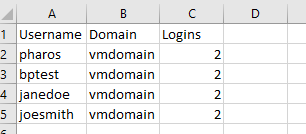
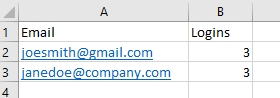
The Logins field says which registrations to remove:
| Logins value | Removes |
|---|---|
| 1 | PIN |
| 2 | Proximity card |
| 3 | PIN and proximity card |
| 4 | Mobile |
| 5 | Mobile and PIN |
| 6 | Mobile and card |
| 7 | Mobile, card and PIN |
Active Directory
| CSV field | Parameter (column header in the command) | Required |
|---|---|---|
| Username | UsernameColumnName=Username | Yes |
| Domain | DomainColumnName=Domain | Yes |
| Logins | LoginsColumnName=Logins | Yes |
Example CSV file:
curl -X POST '<base URL>/active-directory-users/remove-logins' -H 'Authorization: bearer <Authorization Key>' -H 'Content-Type: multipart/form-data' -F 'UsernameColumnName=Username' -F 'DomainColumnName=Domain' -F 'LoginsColumnName=Logins' -F 'File=@<CSV file path>;type=application/vnd.ms-excel'
OpenID Connect or Internal authentication
| CSV field | Parameter (column header in the command) | Required |
|---|---|---|
| Email address | EmailColumnName=Email | Yes |
| Logins | LoginsColumnName=Logins | Yes |
Example CSV file:
curl -X POST '<base URL>/users/remove-logins' -H 'Authorization: bearer <Authorization Key>' -H 'Content-Type: multipart/form-data' -F 'EmailColumnName=Email' -F 'LoginsColumnName=Logins' -F 'File=@<CSV file path>;type=application/vnd.ms-excel'